What is an AI Agent, Exactly?
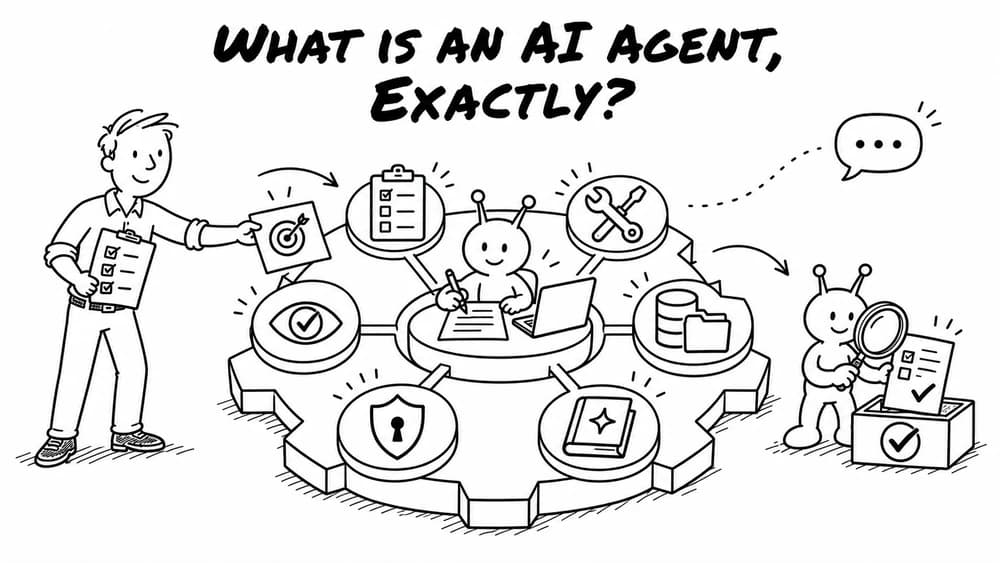
An agent is an AI system that can take action. More than just a chat box. Actions include running code, searching the web, creating email drafts, and much more. An agent is like an operating system for AI.
It's no secret agents are ushering in massive productivity gains. With recent leaps in both model intelligence and agent orchestration, agents have broken through.
Engineers with agents are estimated to become 10x to 100x more productive versus previous generations.
But what is an agent, exactly? In this post, we break down the components of an AI agent.
Note: this article mostly covers long-horizon agents (coding agents, research agents, multi-step workflows), not conversational agents (like customer support).
System instructions (AGENTS.md or CLAUDE.md)
System instructions are foundational instructions you set for your agent about important conventions.
Usually written as markdown (md) files, AGENTS.md is a widely used standard (although Anthropic uses CLAUDE.md). System instructions should be concise (under 200 lines) as it's sent in every session/message. You don't want to bloat the context window with excessively long instructions.
System instructions help your agents stay within the guidelines of your company.
Tools
Tools are the workhorses of agents. Essential tools include Read, Write, Edit, and Bash (for terminal commands). More advanced tools include Web Search and more. These tools can go out and extract information, process it, and then write a report to your local computer.
Tools help your business get more actual work done, efficiently.
Integrations and Connectors
Agents often need to integrate with data outside of your files. You can use MCP servers or APIs to connect to external data so it can be used in your agent. This allows you to connect and pull in information with third-party platforms (such as SaaS tools like email, project management or CRM software).
Integrations and connectors connect to the sources of data you already use for maximal impact.
File System
Agents will read and write files as mentioned. So you will need a file system to facilitate this. A local agent can simply read and write to your computer. You could also connect something like Google Drive through an integration. Some harness, such as Claude Cowork, will have a simple file system created for use with an agent.
Config
This is basically the settings of your agent, for key information such as environment variables and parameters. This is technical information for configurations of your agents. These can be in an .env file, json config file or other formats.
Permissions
Agents are autonomous meaning they do a lot automatically. Some actions may be potentially risky. Permissions can be set up such that you approve every action. Due to the tedium of accepting a ton of actions, many AI builders set the permissions to "YOLO mode" which is riskier but much faster and easier route which auto approves all actions. Claude has a similar mode called auto mode.
Skills
Generally, the more you tell agents what to do, the better they are. Think of skills like SOPs (standard operating procedures). These are processes written in natural language usually in a SKILL.md file. Since they are markdown files, they can be easily editable. Once you make a skill they are reusable for future projects. These can be made available globally to all projects or restricted to a specific project. During discovery phase, your agent should automatically find this skills and will reference when needed.
This is how your turn your years of experience into a well-oiled machine.
Context
Another important piece is context. Context are usually reference data you provide to agents with specific institutional knowledge or domain expertise helpful to the project. These can be a business plan, compliance guidelines, really almost anything. These are usually markdown files but don't have to be.
Context allows you to customize your agents to your specific business' needs like a glove.
Memory
Memory is information gathered to improve the project (it's not computer storage). A type of context, it could be a useful fact, past interaction insight, or a correction of a mistake an agent previously made. Hermes and other agents have systems that automatically create memories based on your interactions with the agent and use that to self improve the agent. Memory can be kept in a database or a MEMORY.md file. A markdown file makes it easy to edit and export. Memory is not just in one place though, it's usually layered in several places in the agent.
Note: maybe frontier labs memory sections are not available to users to use as they wish and are instead essentially locked in with the company.
Observability
Traces and Logs
Traces and logs are important metadata about what your agent did. This helps with observability. Additionally, these can be fed back into the agent to create a self-improving mechanism.
Self-improving means your business becomes smarter, faster.
Evals
Evals are tests to verify that the agent did the work you wanted in an acceptable way. Evals are usually code but can also be created artifacts such as html slide decks or screenshots of a website that the agent checks to ensure certain requirements were met.
Subagents
One way to more cost-effectively use agents is through employing sub agents for some tasks. When you work with agents, you become mindful of usage and tokens, especially as the latest models become increasingly expensive. The more context files, conversation turns, memory and other information are in the context window, the more expensive running the agent will be.
Sub agents are spawned in a fresh context-free environment for a specific task that doesn't need all of the context in the main agent thread, saving you tokens (and budget). An answer or summary of the side quest is returned to the main agent thread (not the full conversation).
Models
Models, the LLMs, are essentially the brain of the whole project. They can reason, make decisions, rate, categorize data and more. This helps fill in gaps in code or to make fuzzier decisions that more rigid deterministic code can't. You can make a simple chat-like call using an API of any model provider or if you need a full agent running in your code you can use a SDK.
Planning (Task Management)
Agents are now adept at creating plans and then working their way through the tasks methodically. Plans are like todo lists that keep the agent on task in long-running situations.
Planning helps keep your agents and humans-in-the-loop from going off the rails, saving time and money.
Where do agents live?
The most well known agents are coding agent harnesses. These are your Claude Code, Codex, and Antigravity (for Google Gemini). These started primarily as CLIs in the terminal. For a desktop experience, one can create simple agents in Claude Cowork or Codex's desktop application. There are open source ones, a currently popular choice being Hermes Agent. Most agents are a folder of files with scripts, such as python, that were created by an agent but run outside of it after being created. Agents can live in the cloud, a VPS (Virtual Private Server), or locally on your device.
Most production agents for businesses will run on the cloud or a VPS so they can be accessed anytime, anywhere.
Remote use
Now, you can also communicate with your agent with your mobile phone so that you can steer agents on the go. Claude has Dispatch, Codex has remote capabilities, and Hermes integrates seamlessly with mobile apps such as Telegram or Whatsapp to control your agent.
What about prompts?
Prompts are still used in agents. The difference is they are usually not a single string but compiled from many different sources such as harness instructions, AGENTS.md, skills, context files, and more.
Next steps
So there you have it - the Superfoo take on the building blocks of AI agents. In the future, we may tackle more advanced topics such as sandboxes, caching, and compaction. For now, please reach out if there is any way we can help guide your business in your agentic journey.