Your First AI Pilot: A Step-by-Step Guide for SMBs
Most companies approach their first AI pilot backward. They start with a new model or tool and ask, “What can we build with this?” That maybe leads to an impressive demo but won't become useful day-to-day work.
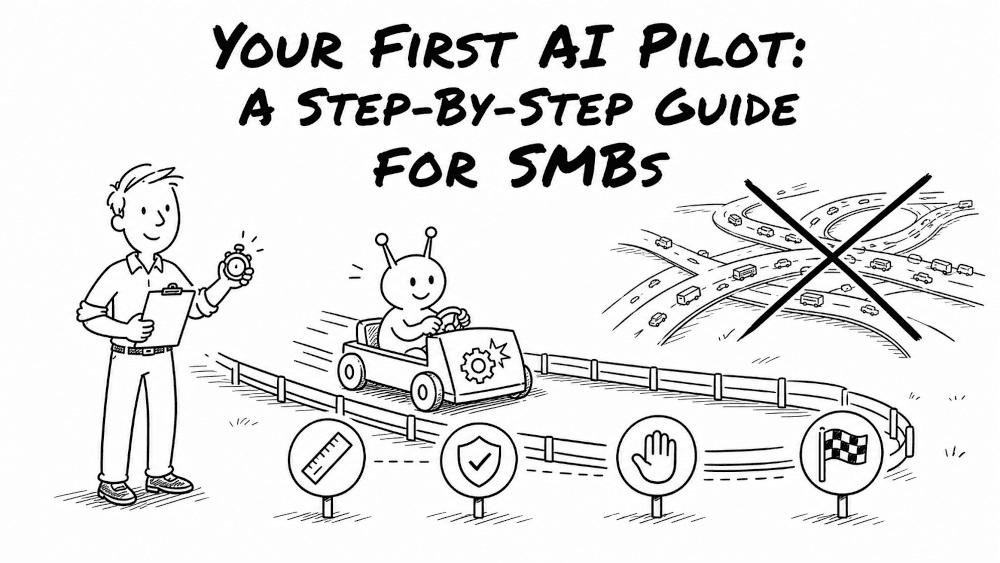
A better AI pilot starts with a business need like a frustrating workflow your team repeats often. Test whether AI can make it faster, cheaper, or better without creating more issues.
Don't try to automate the whole company in your first pilot. The goal is to get the flywheel spinning with a small win, useful learning, and momentum for the next project.
Before you begin, have a basic AI strategy aligned with your business goals and complete an AI readiness assessment. You don't need perfect data, but critical gaps can't be allowed to kill the project.
Here is the playbook for running an AI pilot.
1. Define pilot scope
A good AI pilot tests one well-defined workflow. Start with the business need. What should improve? Which workflow is getting in the way? Who owns it? How will you judge the result?
The best way to choose a pilot project for an AI platform is to look for work your team already knows inside and out. When you improve an existing workflow, you already have a historical baseline, you know where edge cases crop up, and you know what good output looks like. Starting with a brand-new, hypothetical process just adds guesswork to guesswork.
When vetting AI adoption pilot project ideas, use this selection rule: prefer workflows where AI failure is detectable, reversible, and easily escalated to a human.
Write down the workflow, users, duration, data, budget, allowed actions, and human approvals. Keep everyone aligned with a simple hypothesis:
If AI assists with this workflow for this group of users, it will improve these business measures without exceeding these cost and risk limits.
If you're still deciding where AI fits, AI Strategy & Consulting can connect potential pilots to business goals.
2. Establish a baseline and decision criteria
If you don't measure the current process before adding AI, you'll have no clue whether the pilot actually worked.
Measure the current workflow before adding AI. Include review, corrections, handoffs, and exceptions, not just how fast the first draft appears.
| Dimension | Example measure |
|---|---|
| Business outcome | Revenue, cases resolved, cycle time, or customer response time |
| Quality | Accuracy, acceptance rate, defects, or policy compliance |
| Human effort | Review time, correction time, and manual interventions |
| Adoption | Active users, repeat use, and workflow coverage |
| Risk | Privacy events, unsupported claims, or unauthorized actions |
| Economics | Total cost per completed, acceptable outcome |
Pick a few measures that matter. Refine the scorecard as you learn which numbers predict real success.
Measure adoption and business impact, not just deployment, to understand where AI is creating real value.
Set a date for a go or no-go decision. Define success, reasons to revise, and conditions for an immediate pause. This prevents a zombie project that lives forever because nobody wants to kill it.
3. Assemble a small team that wants the pilot to work
A common pitfall in mid-sized businesses is isolating AI pilots inside IT or creating a team that operates in a silo. You need a mix of top-down direction and bottom-up input. Leadership should set priorities and remove roadblocks. Frontline employees should help design and test the pilot because they know the weird exceptions and unwritten rules.
The classic Bell Labs formula worked because it paired brilliant people from different disciplines, gave them room to experiment, and made sure they talked to each other. Your AI pilot needs that blend.
A practical pilot team may include:
- One business owner accountable for the result
- One or more frontline users who know the workflow
- A domain expert who can judge quality and edge cases
- A technical lead or outside implementation partner
- A security, privacy, or risk reviewer when sensitive data is involved
Keep the team small. Pair technical builders with the frontline operators who live in the workflow. If you bring in an external partner through specialized AI consulting services, embed them directly with your internal subject matter experts. Superfoo's AI Agents & Automations service does exactly that inside the tools and workflows a team already uses.
4. Map the current workflow
Don't automate the idealized version of your workflow that lives in an outdated slide deck. Watch someone perform the real work. Record the trigger (screen recordings work great!), inputs, tools, decisions, handoffs, exceptions, final output, and how a person checks it.
You may discover that the visible pain isn't the root cause. Unnecessary approvals, bad data, or a step better suited to regular software may be the real problem.
Once you map the real process, design the AI-assisted version around professional judgment. Decide what AI prepares, what a person approves, and what gets escalated. Keep Jensen Huang's philosophy from NVIDIA in mind: do as much as needed, and as little as possible.
5. Prepare the data, context, and technology
Give the system only what it needs: the workflow, good examples, product information, policies, approval rules, and known exceptions. Dumping every company file into a prompt raises cost and buries key instructions.
You may want to test multiple models and tools to evaluate which is most effective. Compare full cost per successful outcome, not token price. A cheap model that needs constant correction may cost more overall.
Build enough to test the hypothesis safely. Put the pilot inside tools employees already use when practical.
For pilots centered on recurring proposals, reports, forms, or packets, Automated Documents & Workflows may be a natural fit.
6. Set risk, security, and governance boundaries
Governance defines the conditions under which the pilot may run.
Before launch, answer:
- What data will be submitted to the AI?
- Is personal, confidential, or regulated information involved?
- Which systems and permissions will the AI receive?
- Which actions require human approval?
- Who reviews the output?
- What happens when it fails, and how can the team shut it down?
Prompt instructions aren't a permissions system. Block prohibited access at the account, tool, or infrastructure level.
Start with drafts or recommendations. Require approval for consequential actions. Expand authority only after evidence of reliability.
Autonomy is earned.
7. Run the pilot
Start with the workflow you can explain and check, not the agent that sounds impressive.
Build the simplest version that tests your hypothesis. Manual steps behind the scenes are fine.
Test with a small group. Start with historical cases, then process live work without affecting decisions. If results hold up, move to human-reviewed assisted operation.
Hold a short weekly meeting to review the scorecard, feedback, issues, and next steps. Make it safe to report bad outputs and workflow problems.
8. Test, observe, and iterate
AI capability is spiky. A model can be great at nine examples and then fail on the tenth.
Use messy inputs and exceptions. Review correctness, completeness, unsupported claims, policy compliance, and escalation.
Save traces and logs. When something fails, find out whether the cause was the model, context, instructions, source data, integration, or workflow.
Turn important failures into replayable tests. Apply the least expensive fix, rerun the case, and check for regressions.
Don't panic if the task takes slightly longer during the first few weeks. Economist Erik Brynjolfsson describes this as the productivity J-curve. Transformative technology can cause an initial dip while teams adjust habits and redesign processes. Early studies of developers using AI even found some completing tasks slower because they spent extra time inspecting and fixing model outputs.
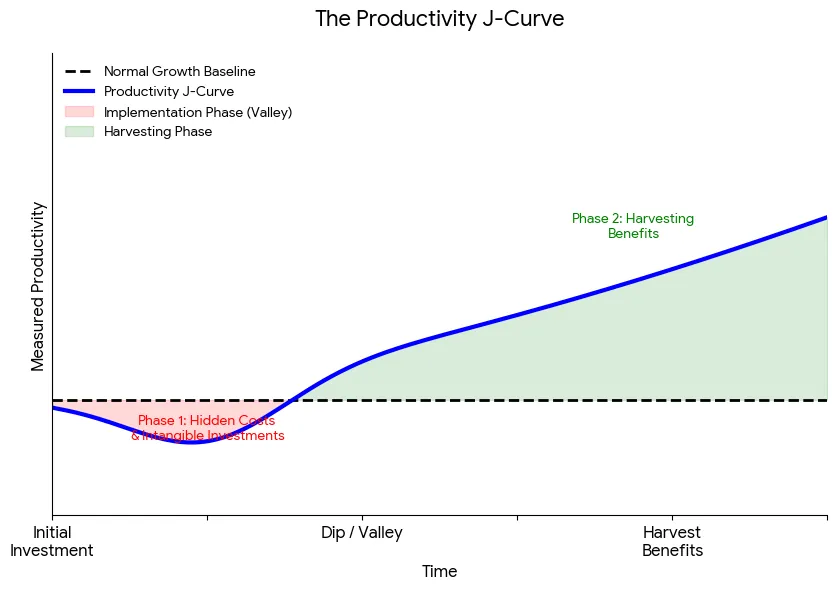
We've seen this before. In the 1880s, factories replaced steam engines with electric motors but kept their old floor plans. Productivity barely moved. The gains came when factories redesigned work around flexible electric power, including the assembly-line model Ford later made famous. AI pilots should test the technology, but they should also redesign the workflow around what the technology makes possible.
Jeff Bezos put the right mindset into his 2014 shareholder letter: “Failure comes part and parcel with invention. It's not optional. We understand that and believe in failing early and iterating until we get it right.”
9. Evaluate the result and make a decision
Compare results with the baseline. Include review, corrections, retries, support, and downstream work. Active users alone don't prove value.
At the end, make one of four decisions:
- Scale when the workflow creates enough value, users adopt it, risks are controlled, and ongoing costs make sense.
- Revise when the idea remains promising but the context, process, integration, training, or controls need work.
- Pivot when the technology showed value but the original workflow was the wrong target.
- Stop when the benefit is too small, risk is too high, adoption is unlikely, or regular automation is a better answer.
A pilot that ends in a “Stop” decision isn't a failure. It saved your business months of wasted budget, surfaced critical process insights, and taught your team how to evaluate emerging technology with discipline.
Common AI pilot mistakes to avoid
Avoid these common mistakes:
- Starting with an AI feature instead of a business problem
- Trying to automate an entire department at once
- Picking work that is rare, high risk, or hard to evaluate
- Skipping the baseline and relying on employee impressions
- Measuring draft speed while ignoring review and correction time
- Giving an agent more data or permissions than it needs
- Letting the pilot continue without a dated management decision
The best way to start an AI pilot project is pretty simple: choose one useful workflow, build only what you need to test it, keep people accountable, and measure the complete result.
Want help running an AI pilot project? Book a free consultation with Superfoo. We'll help you define the workflow, build the smallest credible solution, and get to a clear scale, revise, pivot, or stop decision.