Your Company Needs an AI Policy
Most workplace AI policies boil down to a single sentence in an employee handbook: "Do not paste confidential company data into ChatGPT."
AI in the workplace has moved beyond chatbots to analyzing spreadsheets, drafting client emails, writing code, and triggering background automations. A one-line warning tells your team nothing about permissions, review standards, disclosures, or autonomous workflows.
Outright bans drive shadow AI underground as staff paste work into personal phones to hit deadlines.
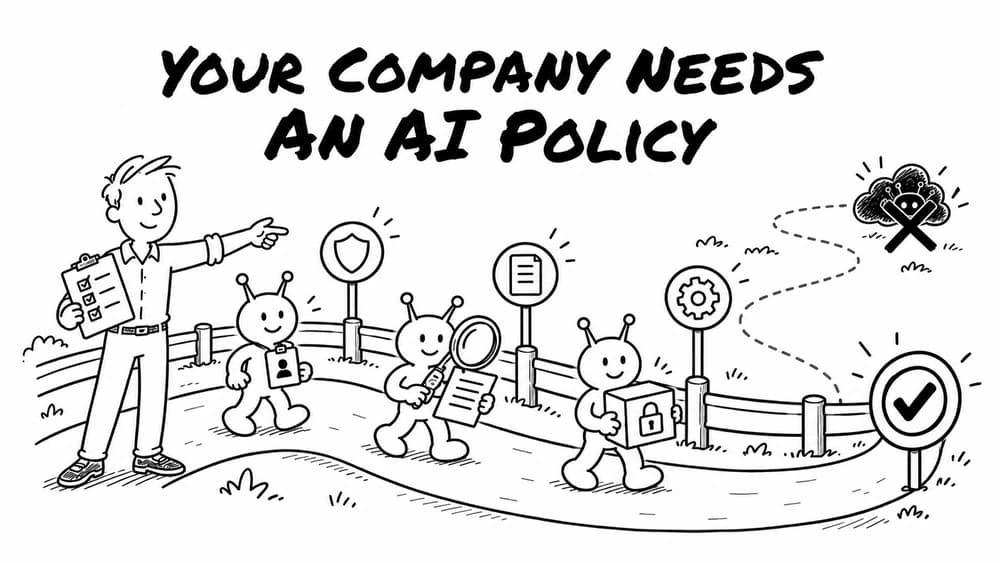
For SMBs, the goal is simple: make responsible use easier than irresponsible use. You need a clear workplace AI policy that sets visible guardrails, protects company data, and keeps humans accountable for outcomes.
Here is how to build one that works.
1. Start with a short, shared artificial intelligence policy
Your core AI policy should fit on two pages. If employees need a law degree to understand it, nobody will read it. It should address full-time staff, managers, contractors, and freelancers.
Anchor the policy to seven core principles:
- Use approved tools and company accounts, never personal logins.
- Protect customer, employee, and company data at all times.
- Keep authoritative records in official systems, never in disposable chats.
- Disclose AI assistance when it shapes a deliverable or decision.
- Verify every output before relying on it or sharing it.
- Assign a named human owner to every deliverable and automated workflow.
- Report errors, hallucinations, and data leaks immediately without fear of reprisal.
An effective AI use policy references existing guidelines instead of repeating them. Open with a simple commitment:
"[Company Name] supports responsible AI use to eliminate routine busywork. We expect team members to protect data, verify outputs, disclose significant AI contributions, and take personal ownership of whatever they ship."
2. Make approved use clear so shadow AI loses its appeal
Shadow AI thrives when official paths are slow or confusing.
List approved tools and account tiers. Mandate commercial accounts with zero-retention agreements over consumer tiers. Address extensions, plugins, and meeting recorders that transmit data to third parties.
Provide an exception form reviewed within days so staff do not bypass IT. Different roles need different tools: writers use Claude for outlines, while engineers use coding tools in sandboxes.
Give employees concrete guardrails with clear AI policy examples across three operational tiers:
| Tier | Permitted Activities | Requirements |
|---|---|---|
| Generally Permitted | Brainstorming, drafting outlines, summarizing public docs, data formatting. | Normal self-check. Verify facts before sharing. |
| Restricted Use | Client deliverables, legal reviews, financial models, code, customer records. | Mandatory peer or managerial review before release. |
| Strictly Prohibited | Entering customer PII, uploading credentials, bypassing access controls. | Zero tolerance. Immediate incident escalation. |
Clear tiers help workers make quick decisions without consulting legal counsel for every prompt.
3. Protect company and personal data
Data exposure remains the biggest headache for SMBs. Train staff on six plain-language data tiers:
- Public data: Marketing copy and press releases. Safe for approved tools.
- Internal data: Roadmaps and memos. Allowed only in commercial accounts.
- Confidential data: Financials and proposals. Requires approval and zero-retention settings.
- Personal and regulated data: Customer PII, health records, and payroll data. Never input into public models.
- Proprietary intellectual property: Core algorithms, trade secrets, and code. Requires isolated environments.
- Credentials and secrets: Passwords, API tokens, and keys. Strictly banned from all prompts.
Free consumer tiers often use prompts to train future models while commercial tiers have zero retention options. Beware false anonymization: stripping a client name does not anonymize a ticket if renewal dates and contract terms remain. Transcripts are never systems of record; verified numbers must live in your CRM, database, or wiki. If you are structuring internal data, our guide to building AI Knowledge Systems walks through keeping internal information secure and verified.
4. Keep a human accountable and define what review means
Slapping a label that says "human-in-the-loop" onto an AI workflow does nothing if the reviewer rubber-stamps whatever the model spits out.
Establish an unbreakable principle: an AI model can draft or analyze, but an identifiable human owns the deliverable. If a proposal contains bad math or an email offends a client, the employee who approved it is responsible.
Give your team a practical review rubric:
- Accuracy: Did the model hallucinate dates, numbers, or citations?
- Evidence: Can factual claims be verified against authoritative sources?
- Security: Are customer identifiers or credentials exposed?
- Brand alignment: Does the output sound natural, or robotic?
- Reversibility: If this recommendation is wrong, what is the cost to fix it?
Tailor standards to risk. Brainstorms tolerate creative variation, but payroll, tax filings, and production code demand independent recalculation. AI authority expands only after a workflow demonstrates documented reliability.
5. Require proportionate AI disclosure
AI disclosure should be practical, not pedantic. People should not need to disclose that an assistant fixed punctuation in a Slack message.
Require explicit disclosure when knowing AI was involved affects trust or compliance:
- Generating a substantial portion of a client deliverable or published analysis.
- Informing an employment decision, such as screening resumes or ranking candidates.
- Summarizing legal, financial, or regulatory evidence used in major business decisions.
- Producing marketing images, voiceovers, or videos where authentic origin matters.
- Whenever a client contract or industry regulation mandates notification.
A simple disclosure works best: "This report was prepared with AI research assistance and reviewed for accuracy by the author." Clear disclosure builds trust by showing you use modern tools responsibly rather than hiding shortcuts.
6. Govern AI agents and workflow automation by what they can do
Chatbots generating text in a browser pose moderate risk. Autonomous agents that read databases, call APIs, and modify records require a different governance model.
When implementing AI workflow automation, govern systems by capabilities:
- Access: Which databases can the agent read, and which systems can it modify?
- Autonomy: What actions can it take independently versus actions requiring approval?
- Operational limits: What are its daily spending limits and loop caps?
- Observability: Where are logs stored, and how does a human trigger an emergency shutoff?
Prompt instructions are not a permissions system. Telling an agent in a prompt "do not share confidential files" is not access control. Enforce boundaries through scoped API tokens, read-only roles, sandboxes, and validation gates.
Start with low-risk, reversible tasks like sorting support tickets or parsing invoices. You can evaluate the broader architecture in our breakdown of multi-agent AI orchestration. When you are ready to put production controls around multi-step pipelines, explore our dedicated AI Agents & Automations practice.
7. Design work for human judgment and address workplace changes honestly
Avoid "tokenmaxxing," where employees are incentivized to spend as many tokens as possible regardless of usefulness.
Design workflows so humans contribute real judgment:
- Automate predictable work completely: If a task runs reliably with deterministic code, automate it end to end. Do not force staff to click "approve" on routine items.
- Focus human time on high-context tasks: Use saved hours for client relationships, trade-offs, and complex decisions.
- Reward business outcomes, not AI volume: Track real results like faster resolution and fewer errors.
A credible policy also protects employee rights. If you use AI for hiring, scheduling, monitoring, or reviews, be transparent. Tell workers what tools you use, what data feeds them, and who reviews outputs. Never let algorithms make unreviewed employment decisions, and protect staff who raise concerns.
Similarly, instead of dodging concerns about AI replacing jobs, discuss workplace changes directly. In most SMBs, AI does not wipe out departments overnight; it automates discrete tasks. That frees capacity to tackle backlogs or grow without hiring surges. Addressing worries about AI job displacement starts by mapping tasks instead of assuming whole roles vanish. Involve frontline staff in testing, and train team members to take on higher-value work.
8. Build shared skills and use a lightweight AI governance framework
Without structured training, employees hoard private tricks while coworkers struggle manually.
Invest in practical AI literacy training focused on operational skills: feeding clean context, catching errors, knowing when to avoid AI, and maintaining a shared prompt library in your wiki.
You do not need an enterprise compliance committee. A lightweight AI governance framework with one designated owner works best for growing businesses:
- Inventory tools: Track approved tools and automations in a registry.
- Assign an owner: Name a leader responsible for policy updates and reviews.
- Conduct an AI risk assessment: Evaluate data sensitivity, audience, and failure impact.
- Audit vendor terms: Confirm commercial privacy terms and zero-retention guarantees.
- Run a controlled pilot: Test with a small team on low-risk workflows first. Check our guide on running an AI pilot project to structure trials.
- Monitor performance: Track spending, error rates, and team feedback.
- Reassess quarterly: Retire weak tools and update guardrails as models evolve.
Mistakes happen. Establish a blameless channel where staff flag data leaks or hallucinations. Revoke compromised keys immediately, then convert failures into test cases to harden prompts.
If your team wants help connecting tools to business goals, read our guide on creating an AI strategy aligned with business goals or explore our AI Strategy & Consulting services.
9. A practical decision checklist and adaptable AI policy template
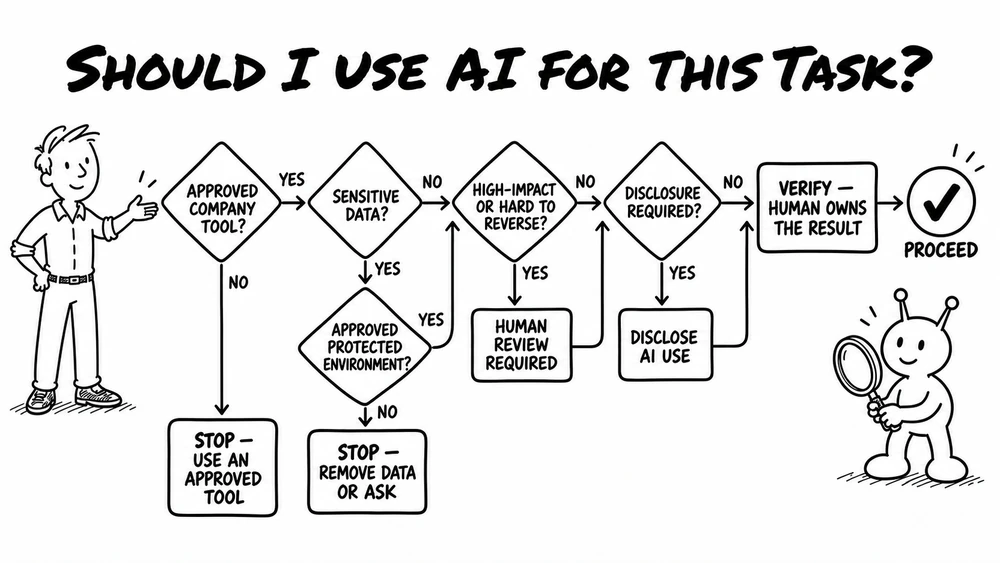
Before using an AI tool on company work, run through this checklist:
- Task fit: Is AI appropriate, or is regular software faster?
- Approved account: Are you using an approved company login?
- Clean data: Have you scrubbed customer PII and credentials?
- Source of truth: Does data live in company systems, not chat?
- Precision: Does this require exactness or allow variation?
- Reversibility: Can this action be undone if the model errs?
- Human owner: Who is the named person accountable?
- Disclosure: Does the deliverable or contract require notice?
- Reusability: Should this workflow join our shared library?
- Incidents: Do you know how to report an issue?
Here is an adaptable AI policy template and AI acceptable use policy template for your handbook:
- Scope: Covers all staff, contractors, and freelancers.
- Ownership: AI assists; named humans stay 100% accountable for outcomes.
- Tools: Use commercial accounts with zero data retention. Personal logins and unvetted extensions are barred.
- Data: Never input credentials, customer PII, or trade secrets. Company systems remain authoritative.
- Review: External deliverables require human verification of facts and calculations.
- Disclosure: Disclose AI assistance when substantial or contractually required.
- Agents: Automations require scoped permissions and spending caps. No autonomous external emails.
- Incidents: Report data leaks or tool failures immediately without reprisal.
Quick AI policy examples in action
How these rules apply in daily work:
- Marketing draft: Permitted. Draft with LLM, verify facts, edit for voice, publish without disclosure.
- Customer contract: Restricted. Summarize redlines with enterprise AI; legal reviews and approves.
- Payroll calculation: Prohibited for generation. Use deterministic software, never AI.
- Support ticket routing: Permitted with boundaries. Agents categorize tickets; humans reply.
Make responsible AI use your default advantage
A good workplace AI policy is neither a total ban nor an unmonitored free-for-all.
Clear guardrails mean employees never have to guess whether using AI will cause trouble. They know which tools are safe, how to handle data, and what review standards apply before shipping work.
By pairing clear permissions with shared learning, you turn scattered AI experiments into a repeatable competitive advantage.